Commands/git + github
5. 고급 git commands
꼰대코더
2025. 2. 27. 02:54
※ 이력은 $ git log 를 통해 확인 가능
1. 직전 commit 를 수정
 |
myfile.txt 를 수정
| $ git add myfile.txt $ git commit --amend => "second commit" 가 표시되고 수정가능 => "second & edit commit" |
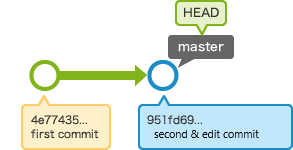
2. revert | reset
이전의 commit 을 취소하는 기능은 같으나 로그가 남는(revert)것과 남지 않는(reset)것이 다른 점이다.
팀으로서 개발시에는 다른 팀원들이 이력을 알 수 있도록 하는 면에서 revert 를 추천한다.

| $ git revert HEAD => 자유롭게 메세지 수정 가능 |

| $ git reset --hard HEAD~~ |

3. cherry-pick
master(second commit)에서 분기되어 있는 branch의 "edit-1 commit" 의 내용을 반영하고자 하는 경우.
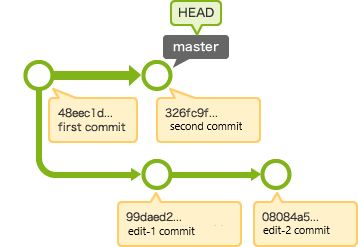
| $ git checkout master Switched to branch 'master' $ git cherry-pick 99daed2... |
혹시 conflict 가 발생하면 수정을 한후
| $ git add myfile.txt $ git commit |
4. merge --squash
merge 와 다른점은 브랜치의 commit 이력이 전부 사라진다는 것이다.
